Seating charts for weddings & events
Seat every guest without the spreadsheet stress.
Paste your guest list, add your tables, tap to seat people, and see the whole room on a floor plan. SeatGrace is free to use, needs no account, and keeps your guest list on your own device.
- Unlimited guests and tables, free
- No sign-up, no email
- Meal choices & dietary notes
- Works on your phone
Paste your guest list
One name per line. Add groups, meals and dietary notes as you go.
Add tables & seat people
Round, long or square tables. Tap or drag guests into seats.
Arrange the room & print
Lay out the floor plan, then print it and a table-by-table list.
Your seating plan
Saved automatically in this browser.
Guests
Tables
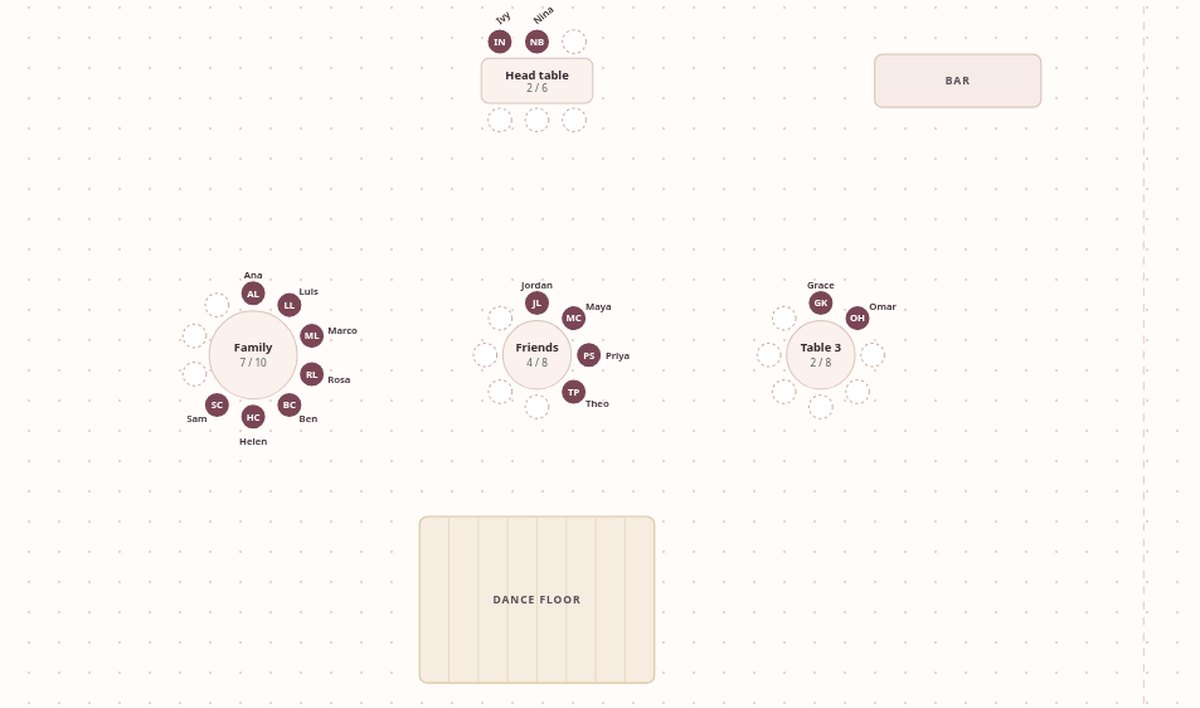
Floor plan
Drag tables to match your room, or tap one and use the arrows. Drag empty space to pan.
Each table is a button. Press Enter to select a table, then use the arrow keys to move it. Hold Shift to move faster. Press Escape when done.
Print & save Free
Sharing with a partner or planner? Download a backup and send the file. They can open it with “Restore backup.”
SeatGrace Pro
Finish faster, and hand off a plan that looks the part
One-time $7 unlock. Everything above stays free.
Auto-arrange
Seats unseated guests for you: groups stay together, “keep apart” pairs are respected, and locked guests don’t move.
Keep apart
For the exes, the feuding uncles, the coworkers who shouldn’t share a table.
Caterer & venue report
Meal totals, meal counts for every table, and a list of dietary notes with table names, ready to print or save as PDF. Also adds meal counts to each table card. CSV export includes meals and notes.
Place cards, escort list & table signs
Three print styles. Place cards fold into tent cards that read from both sides and can show each guest’s meal for the servers.
Secure checkout by Stripe. No subscription, no account.
Simple, honest pricing
The free planner is the whole planner. Pro adds time-savers and print-ready extras for the final weeks.
Free
$0
- Unlimited guests and tables
- Groups, search, tap or drag to seat
- Meal choices and dietary notes for each guest
- Round, long and square tables
- Live seat counts for every table
- Visual floor plan: drag, zoom, and print it
- Print a table-by-table list
- Backup and restore your plan
Pro One-time
$7 once
- Everything in Free
- Auto-arrange that keeps groups together
- “Keep apart” rules and lock-in-place
- Caterer & venue report with meal counts per table
- Place cards, escort list and table signs in 3 styles
- CSV export with meals and dietary notes
- Dance floor, stage, bar & more on your floor plan
- Save the floor plan as a high-res image
Questions
Where is my guest list stored?
Only in this browser, on this device. SeatGrace has no server and no database, so nothing you type is uploaded. If you switch devices, use “Download backup” and “Restore backup.” Clearing your browser data erases the plan, so keep a backup.
Do I need an account?
No. There’s no sign-up and no email list.
Can my partner or planner work on it too?
There’s no shared online account. Download a backup and send them the file; they can open it with “Restore backup” and send it back the same way.
How do I add meal choices?
Tap the pencil next to a guest to add a meal and a dietary note, or paste them with your list: “Ana Lopez, Family | Fish | No nuts.” Meal totals show under your guest list for free. Pro adds the printable caterer report with counts per table.
What does Pro cost?
$7, once. No subscription and no renewal. Payment is handled by Stripe; SeatGrace never sees your card details.
I paid but Pro isn’t showing.
Pro is unlocked in the browser you paid from. If you cleared your browser data or switched devices, email truellobrands@gmail.com with your Stripe receipt and we’ll help you get it back.
Does it work for things other than weddings?
Yes: galas, banquets, reunions, conferences, and dinner parties. Anything with tables and people.